Working with Lists in Python - Part 2
List Methods
List-type variables have many methods that can help us operate on a list. Suppose we have a list named foos, and the list has a method named bar. The syntax for using list methods is: foos.bar(). This is a syntax for calling object methods through object references. We’ll explain this syntax in detail later when we discuss object-oriented programming. This syntax is also called sending messages to objects.
Adding and Removing Elements
Lists are mutable containers. Mutable containers mean we can add elements to the container, remove elements from the container, and modify existing elements in the container. We can use the list’s append method to append elements to the list, and use the insert method to insert elements into the list. Appending means adding elements to the end of the list, while inserting means adding new elements at a specified position. You can see the code below.
languages = ['Python', 'Java', 'C++']
languages.append('JavaScript')
print(languages)  # ['Python', 'Java', 'C++', 'JavaScript']
languages.insert(1, 'SQL')
print(languages)  # ['Python', 'SQL', 'Java', 'C++', 'JavaScript']
We can use the list’s remove method to delete specified elements from the list. It should be noted that if the element to be deleted is not in the list, it will raise a ValueError error causing the program to crash. So we recommend that before deleting elements, you first use the membership operation we discussed earlier to make a judgment. We can also use the pop method to delete elements from the list. The pop method deletes the last element in the list by default, but you can also provide a position to delete the element at the specified position. When using the pop method to delete elements, if the index value is out of range, it will raise an IndexError exception, causing the program to crash. In addition, lists also have a clear method that can clear all elements in the list, as shown in the code below.
languages = ['Python', 'SQL', 'Java', 'C++', 'JavaScript']
if 'Java' in languages:
    languages.remove('Java')
if 'Swift' in languages:
    languages.remove('Swift')
print(languages)  # ['Python', 'SQL', 'C++', 'JavaScript']
languages.pop()
temp = languages.pop(1)
print(temp)       # SQL
languages.append(temp)
print(languages)  # ['Python', 'C++', 'SQL']
languages.clear()
print(languages) # []Note: When the
popmethod deletes an element, it returns the deleted element. In the code above, we assigned the element deleted by thepopmethod to a variable namedtemp. Of course, if you want, you can also add this element back to the list, just as the codelanguages.append(temp)does above.
There’s a small question here: for example, if the languages list has multiple 'Python' entries, does languages.remove('Python') delete all 'Python' entries or just the first 'Python'? You can guess first, then try it yourself.
There’s actually another way to delete elements from a list, which is to use Python’s del keyword followed by the element to delete. This approach has no substantial difference from using the pop method to specify an index to delete an element, but the latter returns the deleted element, while the former is slightly better in performance because del corresponds to the underlying bytecode instruction DELETE_SUBSCR, while pop corresponds to the underlying bytecode instructions CALL_METHOD and POP_TOP. If you don’t understand, don’t worry about it.
items = ['Python', 'Java', 'C++']
del items[1]
print(items)  # ['Python', 'C++']
Element Position and Frequency
The list’s index method can find the index position of an element in the list. If the specified element cannot be found, the index method will raise a ValueError error. The list’s count method can count the number of times an element appears in the list, as shown in the code below.
items = ['Python', 'Java', 'Java', 'C++', 'Kotlin', 'Python']
print(items.index('Python'))     # 0
# Start searching for 'Python' from index position 1
print(items.index('Python', 1))  # 5
print(items.count('Python'))     # 2
print(items.count('Kotlin'))     # 1
print(items.count('Swift'))      # 0
# Start searching for 'Java' from index position 3
print(items.index('Java', 3))    # ValueError: 'Java' is not in list
Element Sorting and Reversal
The list’s sort operation can sort list elements, while the reverse operation can reverse elements, as shown in the code below.
items = ['Python', 'Java', 'C++', 'Kotlin', 'Swift']
items.sort()
print(items)  # ['C++', 'Java', 'Kotlin', 'Python', 'Swift']
items.reverse()
print(items)  # ['Swift', 'Python', 'Kotlin', 'Java', 'C++']
List Comprehensions
In Python, lists can also be created through a special literal syntax called comprehensions. Below, we’ll use examples to explain the benefits of using list comprehensions to create lists.
Scenario 1: Create a list of numbers in the range 1 to 99 that are divisible by 3 or 5.
items = []
for i in range(1, 100):
    if i % 3 == 0 or i % 5 == 0:
        items.append(i)
print(items)
Using list comprehensions to do the same thing, the code is as follows.
items = [i for i in range(1, 100) if i % 3 == 0 or i % 5 == 0]
print(items)
Scenario 2: There’s an integer list nums1. Create a new list nums2 where the elements are the squares of the corresponding elements in nums1.
nums1 = [35, 12, 97, 64, 55]
nums2 = []
for num in nums1:
    nums2.append(num ** 2)
print(nums2)
Using list comprehensions to do the same thing, the code is as follows.
nums1 = [35, 12, 97, 64, 55]
nums2 = [num ** 2 for num in nums1]
print(nums2)
Scenario 3: There’s an integer list nums1. Create a new list nums2 and put elements from nums1 that are greater than 50 into nums2.
nums1 = [35, 12, 97, 64, 55]
nums2 = []
for num in nums1:
    if num > 50:
        nums2.append(num)
print(nums2)
Using list comprehensions to do the same thing, the code is as follows.
nums1 = [35, 12, 97, 64, 55]
nums2 = [num for num in nums1 if num > 50]
print(nums2)
Creating lists using list comprehensions is not only simple and elegant in code, but also superior in performance to using for-in loops and the append method to add elements to an empty list. Why do comprehensions have better performance? That’s because Python interpreter bytecode instructions have instructions specifically for comprehensions (the LIST_APPEND instruction), while for loops add elements to lists through method calls (LOAD_METHOD and CALL_METHOD instructions), and method calls themselves are relatively time-consuming operations. If you don’t understand this, it doesn’t matter. Just remember the conclusion: “Strongly recommend using comprehension syntax to create lists”.
Nested Lists
Python doesn’t restrict list elements to be of the same data type. This means elements in a list can be of any data type, including lists themselves. If elements in a list are also lists, we can call it a nested list. Nested lists can be used to represent tables or mathematical matrices. For example, if we want to save the grades of 5 students in 3 courses, we can use a list as shown below.
scores = [[95, 83, 92], [80, 75, 82], [92, 97, 90], [80, 78, 69], [65, 66, 89]]
print(scores[0])
print(scores[0][1])
For the nested list above, each element is essentially a student’s grades in 3 courses, such as [95, 83, 92]. The 83 in this list represents this student’s grade in a certain course. If we want to access this value, we can use indexing operations twice: scores[0][1]. Here, scores[0] gets the list [95, 83, 92], and using the indexing operation [1] again gets the second element in that list.
If we want to input grades for 5 students in 3 courses through keyboard input and save them in a list, we can use the code shown below.
scores = []
for _ in range(5):
    temp = []
    for _ in range(3):
        score = int(input('Please enter: '))
        temp.append(score)
    scores.append(temp)
print(scores)
If we want to generate grades for 5 students in 3 courses through random numbers and save them in a list, we can use list comprehensions, as shown in the code below.
import random

scores = [[random.randrange(60, 101) for _ in range(3)] for _ in range(5)]
print(scores)Note: The code
[random.randrange(60, 101) for _ in range(3)]above can produce a list of 3 random integers. We put this code in another list comprehension as list elements. Such elements are generated 5 times, ultimately obtaining a nested list.
List Applications
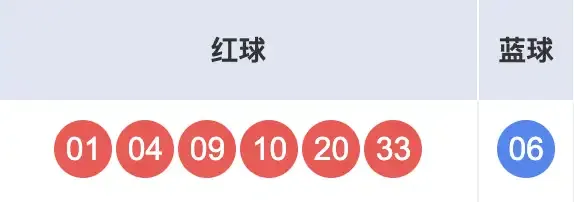
Below we’ll explain list applications through an example of randomly selecting lottery numbers. The Double Color Ball is a lottery-type lottery issued by the China Welfare Lottery Distribution Management Center. Each bet consists of 6 red balls and 1 blue ball. Red ball numbers are selected from 1 to 33, and blue ball numbers are selected from 1 to 16. Each bet requires selecting 6 red ball numbers and 1 blue ball number, as shown below.
Tip: There’s a very brilliant discussion on Zhihu about the essence of various forms of domestic lotteries, which I’ll share with everyone here: “Fabricate a person who gets something for nothing, to fool a group of people who want something for nothing, ultimately supporting a batch of people who truly get something for nothing”. Many people who have no concept of probability even think that the probability of winning or not winning the lottery is both 50%; there are also many people who think that if the probability of winning is 1%, then buying 100 times will definitely win. These are all very absurd ideas. So, cherish life, stay away from gambling, especially when you know nothing about probability!
Below, we’ll use a Python program to generate a set of random numbers.
"""
Double Color Ball random number selection program

Author: Luo Hao
Version: 1.0
"""
import random

red_balls = list(range(1, 34))
selected_balls = []
# Add 6 red balls to selected list
for _ in range(6):
    # Generate random integer representing the index position of the selected red ball
    index = random.randrange(len(red_balls))
    # Remove the selected ball from the red ball list and add it to the selected list
    selected_balls.append(red_balls.pop(index))
# Sort the selected red balls
selected_balls.sort()
# Output the selected red balls
for ball in selected_balls:
    print(f'\033[031m{ball:0>2d}\033[0m', end=' ')
# Randomly select 1 blue ball
blue_ball = random.randrange(1, 17)
# Output the selected blue ball
print(f'\033[034m{blue_ball:0>2d}\033[0m')Note: In the code above,
print(f'\033[0m...\033[0m')is used to control the color of the output content, outputting red balls in red and blue balls in blue. The ellipsis represents the content we want to output.\033[0mis a control code indicating to close all attributes, meaning previous control codes will become invalid. You can also simply understand it as a delimiter. The0beforemrepresents the console display mode as the default value.0can be omitted,1represents highlighting,5represents blinking,7represents reverse display, etc. Between0andm, we can write numbers representing colors, such as30for black,31for red,32for green,33for yellow,34for blue, etc.
We can also use the sample and choice functions provided by the random module to simplify the code above. The former can implement sampling without replacement, while the latter can randomly select one element. The modified code is shown below.
"""
Double Color Ball random number selection program

Author: Luo Hao
Version: 1.1
"""
import random

red_balls = [i for i in range(1, 34)]
blue_balls = [i for i in range(1, 17)]
# Randomly select 6 red balls from the red ball list (sampling without replacement)
selected_balls = random.sample(red_balls, 6)
# Sort the selected red balls
selected_balls.sort()
# Output the selected red balls
for ball in selected_balls:
    print(f'\033[031m{ball:0>2d}\033[0m', end=' ')
# Randomly select 1 blue ball from the blue ball list
blue_ball = random.choice(blue_balls)
# Output the selected blue ball
print(f'\033[034m{blue_ball:0>2d}\033[0m')
If we want to randomly generate N sets of numbers, we just need to put the code above in a loop that repeats N times, as shown below.
"""
Double Color Ball random number selection program

Author: Luo Hao
Version: 1.2
"""
import random

n = int(input('Generate how many sets of numbers: '))
red_balls = [i for i in range(1, 34)]
blue_balls = [i for i in range(1, 17)]
for _ in range(n):
    # Randomly select 6 red balls from the red ball list (sampling without replacement)
    selected_balls = random.sample(red_balls, 6)
    # Sort the selected red balls
    selected_balls.sort()
    # Output the selected red balls
    for ball in selected_balls:
        print(f'\033[031m{ball:0>2d}\033[0m', end=' ')
    # Randomly select 1 blue ball from the blue ball list
    blue_ball = random.choice(blue_balls)
    # Output the selected blue ball
    print(f'\033[034m{blue_ball:0>2d}\033[0m')
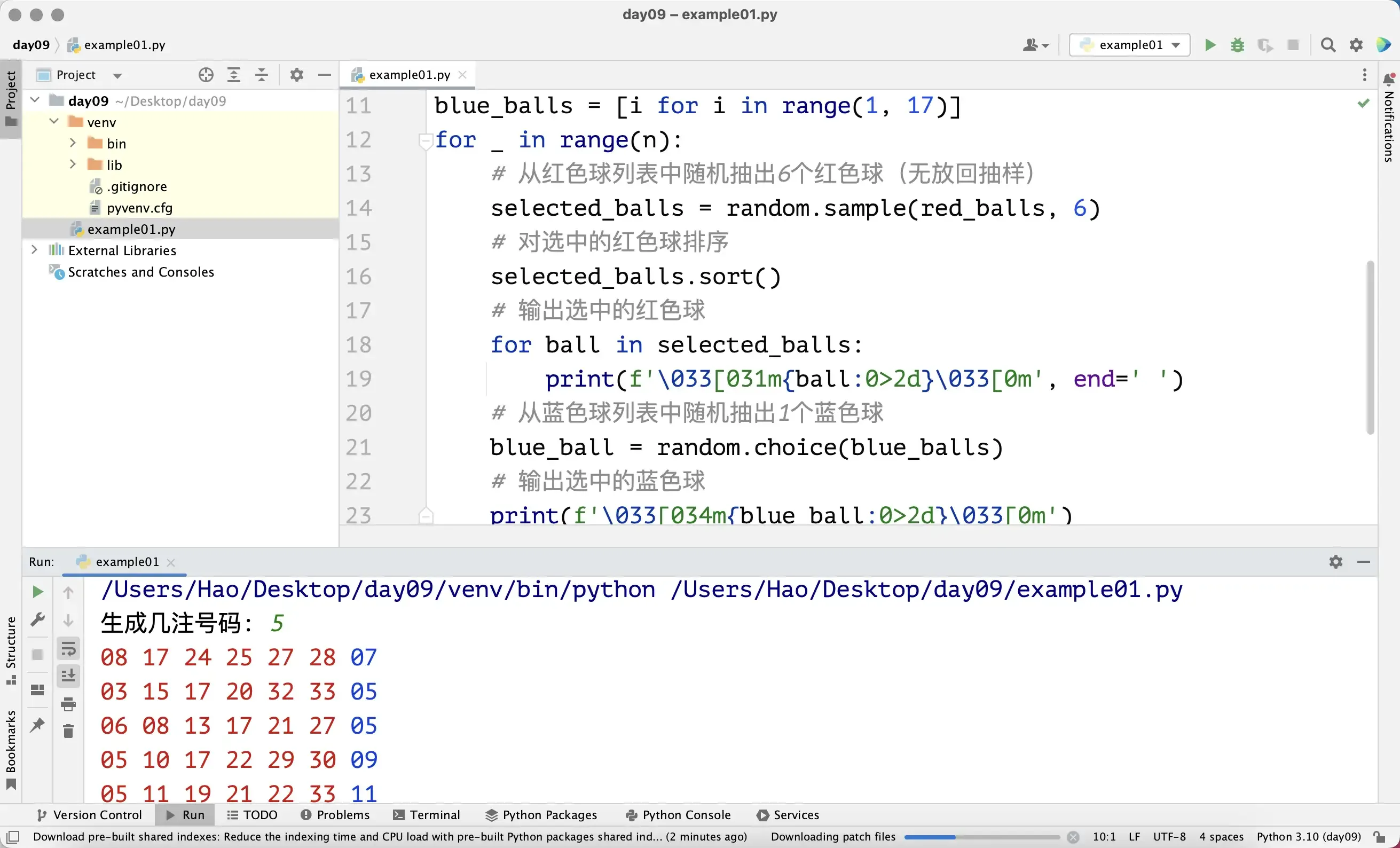
When we run the code above in PyCharm and input 5, the running effect is shown in the figure below.
Here, I’d like to introduce a Python third-party library called rich. It can help us produce the most beautiful output in the simplest way. You can use the Python package management tool pip to install this third-party library in the terminal. For PyCharm users, of course, you should use the pip command in PyCharm’s terminal window to install rich into the project’s virtual environment, as shown in the command below.
pip install rich
As shown in the figure above, after rich is successfully installed, we can use the code shown below to control the output.
"""
Double Color Ball random number selection program

Author: Luo Hao
Version: 1.3
"""
import random

from rich.console import Console
from rich.table import Table

# Create console
console = Console()

n = int(input('Generate how many sets of numbers: '))
red_balls = [i for i in range(1, 34)]
blue_balls = [i for i in range(1, 17)]

# Create table and add header
table = Table(show_header=True)
for col_name in ('Number', 'Red Balls', 'Blue Ball'):
    table.add_column(col_name, justify='center')

for i in range(n):
    selected_balls = random.sample(red_balls, 6)
    selected_balls.sort()
    blue_ball = random.choice(blue_balls)
    # Add row to table (number, red balls, blue ball)
    table.add_row(
        str(i + 1),
        f'[red]{" ".join([f"{ball:0>2d}" for ball in selected_balls])}[/red]',
        f'[blue]{blue_ball:0>2d}[/blue]'
    )

# Output table through console
console.print(table)Note: Line 31 of the code above uses list comprehension syntax to process red ball numbers into strings and save them in a list.
" ".join([...])joins multiple strings in the list with spaces into a complete string. If you don’t understand, you can skip it for now. The[red]...[/red]in the string is used to set the output color to red, and line 32’s[blue]...[/blue]is used to set the output color to blue. For more knowledge about the rich library, you can refer to the official documentation.
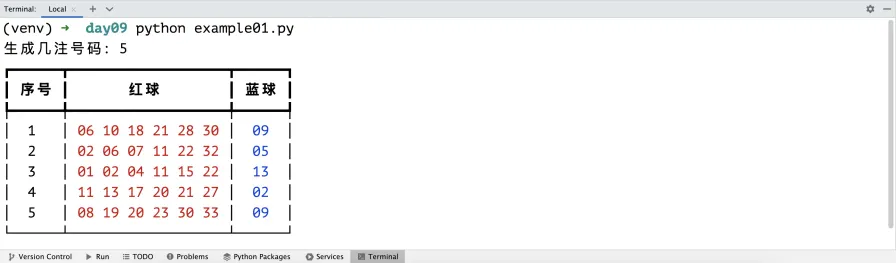
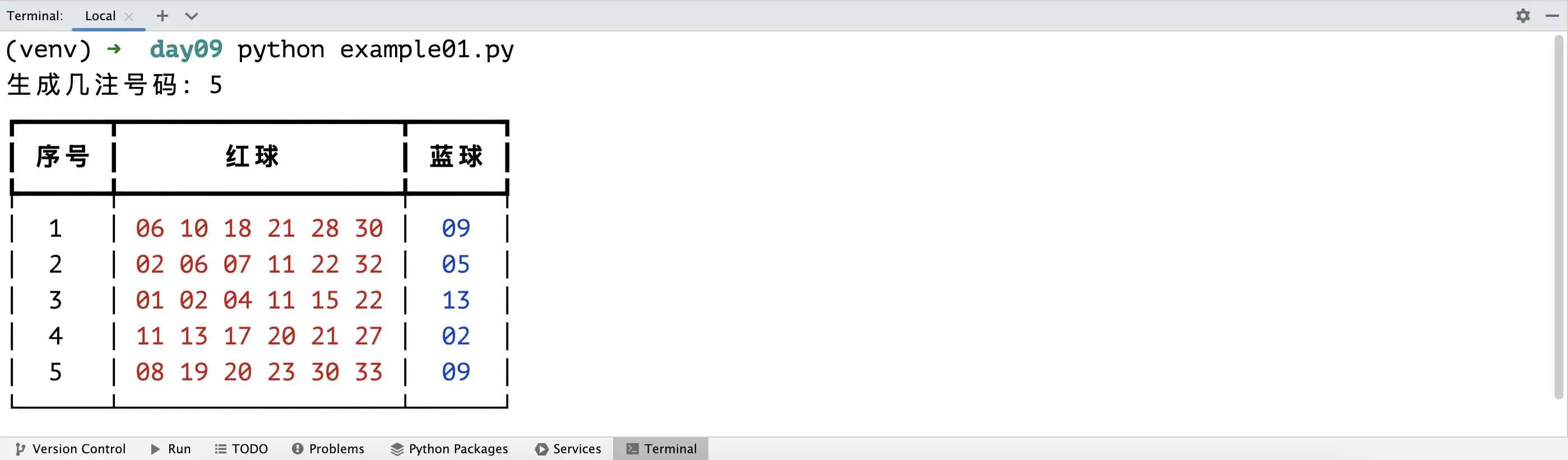
The final output is shown in the figure below. Looking at such output, doesn’t it make you feel a bit better?
Summary
Python lists are essentially dynamically expandable arrays at the underlying level. List elements are stored contiguously in computer memory, so random access can be implemented (obtaining corresponding elements through a valid index, and the operation time is independent of the number of list elements). We can temporarily avoid touching these underlying storage details, and we don’t need everyone to understand the asymptotic time complexity of each list method (the relationship between the time spent executing the method and the number of list elements). I think it’s more important for everyone to first learn to use lists to solve problems at work.