Sending Emails and SMS with Python

In previous lessons, we have taught you how to automatically generate Excel, Word, and PDF documents with Python programs. Next, we can go further by sending the generated documents to specified recipients via email, and then notifying them by SMS that we have sent the email. These tasks can also be easily and happily solved using Python programs.
Sending Emails
In today’s world where instant messaging software is so developed, email is still one of the most widely used applications on the Internet. Companies send job offers to candidates, websites send activation links to users, and banks promote their financial products to customers - almost all of these tasks are completed through email, and these tasks should all be completed automatically by programs.
We can use HTTP (Hypertext Transfer Protocol) to access website resources. HTTP is an application-level protocol built on TCP (Transmission Control Protocol), which provides reliable data transmission services for many application-level protocols. If you want to send email, you need to use SMTP (Simple Mail Transfer Protocol), which is also an application-level protocol built on TCP that specifies the details of how email senders communicate with mail servers. Python simplifies these operations through a module called smtplib into an SMTP_SSL object. Through the login and send_mail methods of this object, you can complete the operation of sending emails.
Let’s first try sending an extremely simple email that does not contain attachments, images, or other hypertext content. To send email, you first need to connect to a mail server. We can set up our own mail server, which is not friendly to beginners, but we can choose to use third-party email services. For example, I have already registered an account at <www.126.com>. After logging in successfully, I can enable the SMTP service in the settings, which is equivalent to obtaining a mail server. The specific operations are as follows.
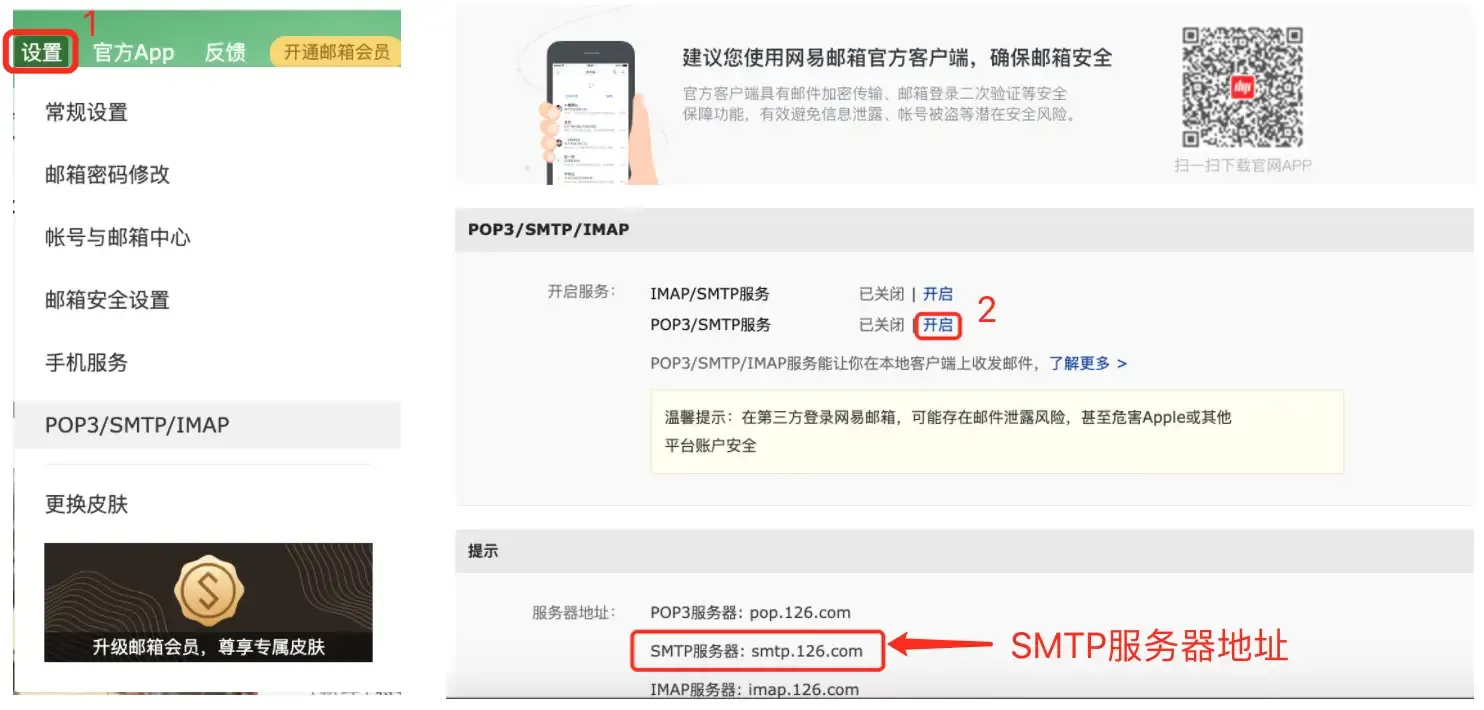
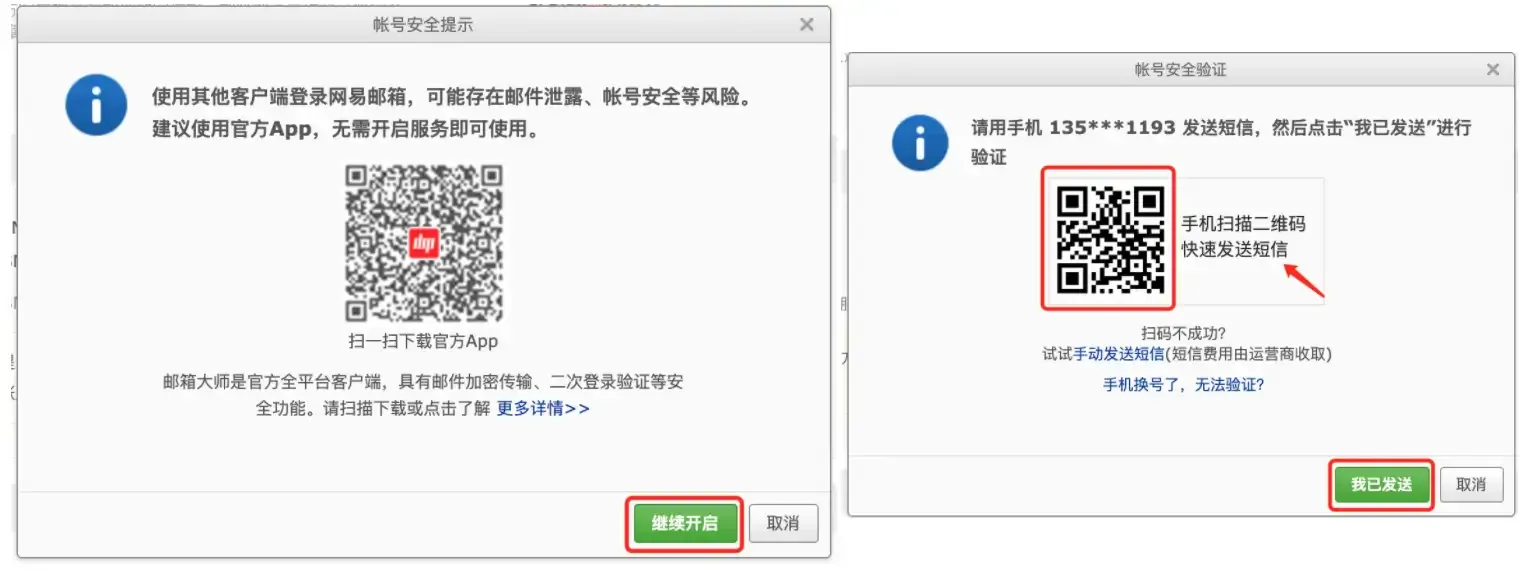
You can scan the QR code above with your phone to obtain the authorization code by sending an SMS. After the SMS is sent successfully, click “I have sent” to get the authorization code. The authorization code needs to be kept properly because once leaked, it will be used by others to send emails on your behalf. Next, we can write the code to send emails, as shown below.
import smtplib
from email.header import Header
from email.mime.multipart import MIMEMultipart
from email.mime.text import MIMEText

# Create email body object
email = MIMEMultipart()
# Set sender, recipient and subject
email['From'] = '[email protected]'
email['To'] = '[email protected];[email protected]'
email['Subject'] = Header('First Half Year Work Report', 'utf-8')
# Add email body content
content = """According to German media reports, on the 9th local time, members of the German train drivers' union voted,
and decided to start a nationwide strike from the 10th local time. The strike on freight traffic started at 19:00 local time on the 10th.
After that, from 2:00 am on the 11th to 2:00 am on the 13th, passenger transport and railway infrastructure across Germany will be on strike for 48 hours."""
email.attach(MIMEText(content, 'plain', 'utf-8'))

# Create SMTP_SSL object (connect to mail server)
smtp_obj = smtplib.SMTP_SSL('smtp.126.com', 465)
# Login through username and authorization code
smtp_obj.login('[email protected]', 'mail server authorization code')
# Send email (sender, recipient, email content (string))
smtp_obj.sendmail(
    '[email protected]',
    ['[email protected]', '[email protected]'],
    email.as_string()
)
If you want to send an email with attachments, you only need to process the attachment content into BASE64 encoding, then it is almost no different from ordinary text content. BASE64 is a representation method based on 64 printable characters to represent binary data. It is often used in situations where binary data needs to be represented, transmitted, or stored, and email is one of them. For students who don’t understand this encoding method, I recommend reading the article Base64 Notes. In previous content, we also mentioned that the base64 module in the Python standard library provides support for BASE64 encoding and decoding.
The following code demonstrates how to send an email with attachments.
import smtplib
from email.header import Header
from email.mime.multipart import MIMEMultipart
from email.mime.text import MIMEText
from urllib.parse import quote

# Create email body object
email = MIMEMultipart()
# Set sender, recipient and subject
email['From'] = '[email protected]'
email['To'] = '[email protected]'
email['Subject'] = Header('Please check the resignation certificate file', 'utf-8')
# Add email body content (content with HTML tags for formatting)
content = """<p>Dear former colleague:</p>
<p>Your resignation certificate is in the attachment, please check it!</p>
<br>
<p>Best wishes!</p>
<hr>
<p>Sun Meili, Today</p>"""
email.attach(MIMEText(content, 'html', 'utf-8'))
# Read the file as an attachment
with open(f'resources/Wang_Dachui_resignation_certificate.docx', 'rb') as file:
    attachment = MIMEText(file.read(), 'base64', 'utf-8')
    # Specify content type
    attachment['content-type'] = 'application/octet-stream'
    # Process Chinese filename into percent encoding
    filename = quote('Wang_Dachui_resignation_certificate.docx')
    # Specify how to handle content
    attachment['content-disposition'] = f'attachment; filename="{filename}"'

# Create SMTP_SSL object (connect to mail server)
smtp_obj = smtplib.SMTP_SSL('smtp.126.com', 465)
# Login through username and authorization code
smtp_obj.login('[email protected]', 'mail server authorization code')
# Send email (sender, recipient, email content (string))
smtp_obj.sendmail(
    '[email protected]',
    '[email protected]',
    email.as_string()
)
To make it easier for everyone to send emails with Python, I have encapsulated the above code into a function. When using it, you only need to adjust the mail server domain name, port, username, and authorization code.
import smtplib
from email.header import Header
from email.mime.multipart import MIMEMultipart
from email.mime.text import MIMEText
from urllib.parse import quote

# Mail server domain name (modify yourself)
EMAIL_HOST = 'smtp.126.com'
# Mail server port (usually 465)
EMAIL_PORT = 465
# Account for logging into the mail server (modify yourself)
EMAIL_USER = '[email protected]'
# Authorization code for enabling SMTP service (modify yourself)
EMAIL_AUTH = 'mail server authorization code'


def send_email(*, from_user, to_users, subject='', content='', filenames=[]):
    """Send email

    :param from_user: sender
    :param to_users: recipients, multiple recipients separated by semicolons
    :param subject: email subject
    :param content: email body content
    :param filenames: file paths of attachments to send
    """
    email = MIMEMultipart()
    email['From'] = from_user
    email['To'] = to_users
    email['Subject'] = subject

    message = MIMEText(content, 'plain', 'utf-8')
    email.attach(message)
    for filename in filenames:
        with open(filename, 'rb') as file:
            pos = filename.rfind('/')
            display_filename = filename[pos + 1:] if pos >= 0 else filename
            display_filename = quote(display_filename)
            attachment = MIMEText(file.read(), 'base64', 'utf-8')
            attachment['content-type'] = 'application/octet-stream'
            attachment['content-disposition'] = f'attachment; filename="{display_filename}"'
            email.attach(attachment)

    smtp = smtplib.SMTP_SSL(EMAIL_HOST, EMAIL_PORT)
    smtp.login(EMAIL_USER, EMAIL_AUTH)
    smtp.sendmail(from_user, to_users.split(';'), email.as_string())
Sending SMS
Sending SMS is also a common function in projects. Website registration codes, verification codes, and marketing information are basically sent to users through SMS. Sending SMS requires the support of third-party platforms. Below we take the Luosimao platform as an example to introduce how to send SMS with Python programs. The details of registering an account and purchasing SMS services will not be elaborated here. You can consult the platform’s customer service.
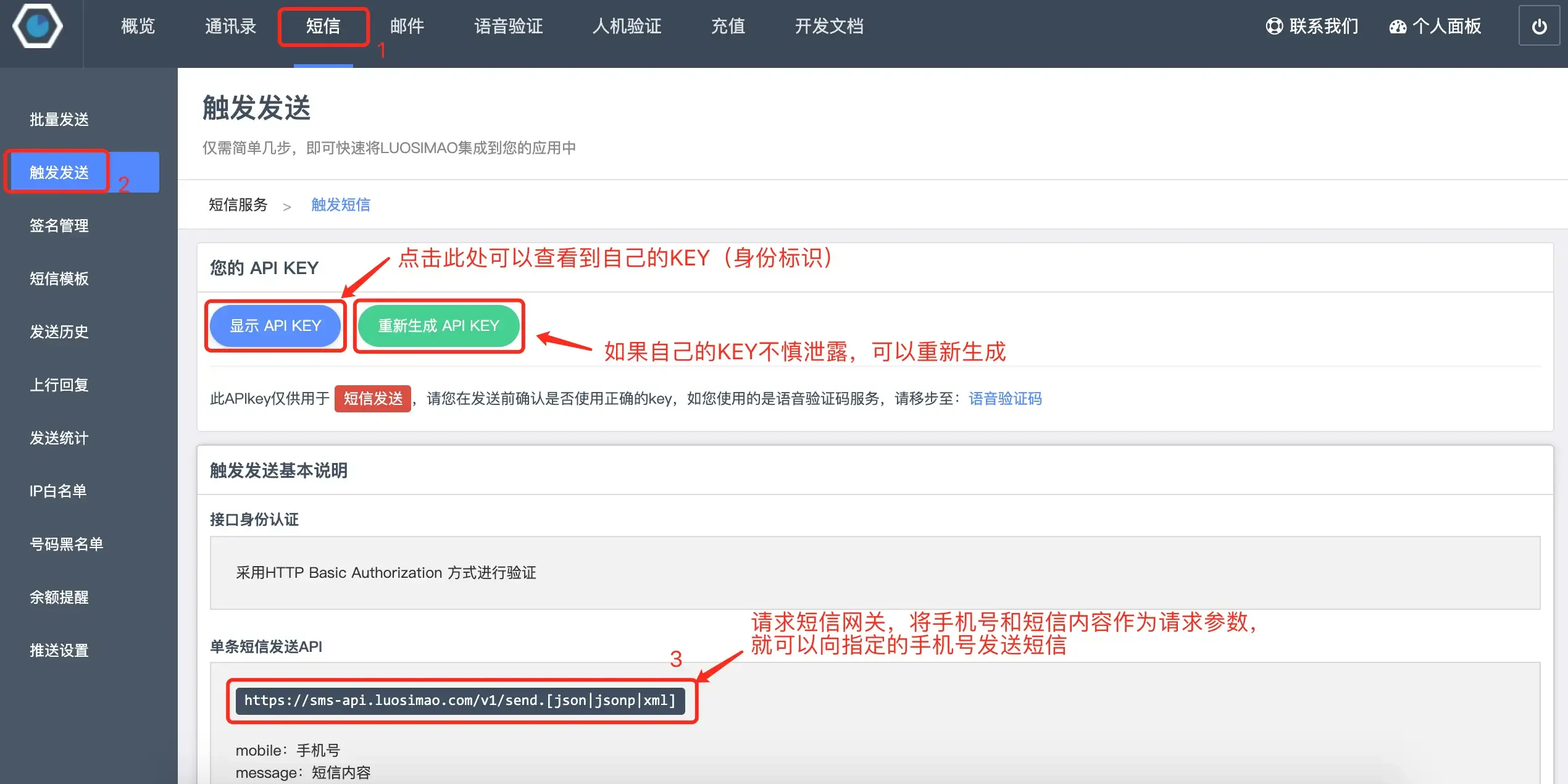
Next, we can initiate an HTTP request to the SMS gateway provided by the platform through the requests library. By passing the mobile phone number receiving the SMS and the SMS content as parameters, we can send SMS. The code is as follows.
import random

import requests


def send_message_by_luosimao(tel, message):
    """Send SMS (call Luosimao SMS gateway)"""
    resp = requests.post(
        url='http://sms-api.luosimao.com/v1/send.json',
        auth=('api', 'key-KEY assigned by platform after successful registration'),
        data={
            'mobile': tel,
            'message': message
        },
        timeout=10,
        verify=False
    )
    return resp.json()


def gen_mobile_code(length=6):
    """Generate mobile verification code of specified length"""
    return ''.join(random.choices('0123456789', k=length))


def main():
    code = gen_mobile_code()
    message = f'Your SMS verification code is {code}, never tell anyone! [Python Course]'
    print(send_message_by_luosimao('13500112233', message))


if __name__ == '__main__':
    main()
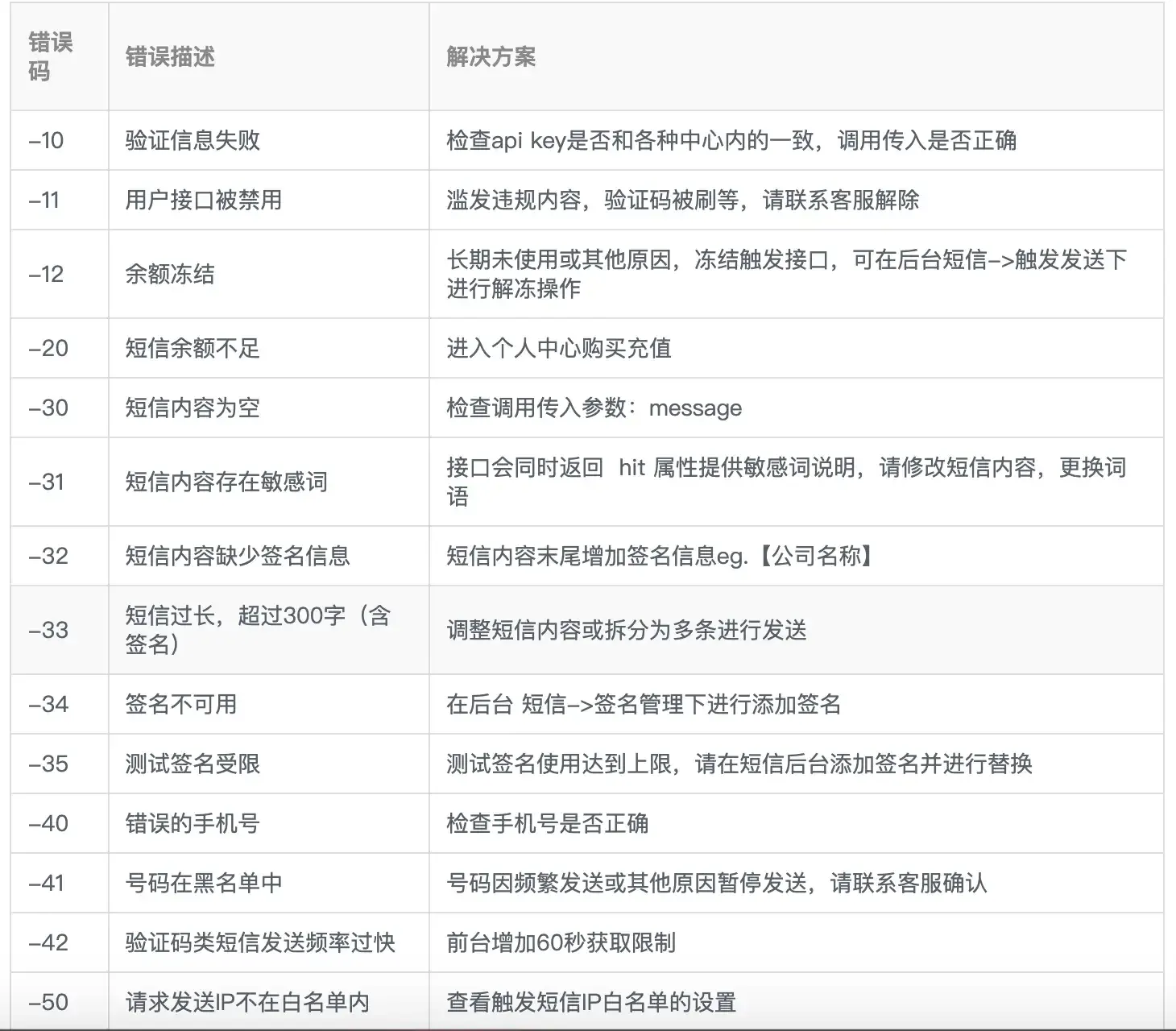
The above request to Luosimao’s SMS gateway http://sms-api.luosimao.com/v1/send.json will return data in JSON format. If it returns {'error': 0, 'msg': 'OK'}, it means the SMS has been sent successfully. If the value of error is not 0, you can check the official development documentation to find out which link went wrong. Common error types on the Luosimao platform are shown in the following figure.
Currently, most SMS platforms require that SMS content must be accompanied by a signature. The following figure shows the SMS signature “[Python Course]” I configured on the Luosimao platform. For some SMS involving sensitive content, you also need to configure SMS templates in advance. Interested readers can research this on their own. Generally, to prevent SMS from being stolen, the platform will also require setting an “IP whitelist”. If you don’t know how to configure it, you can consult the platform’s customer service.
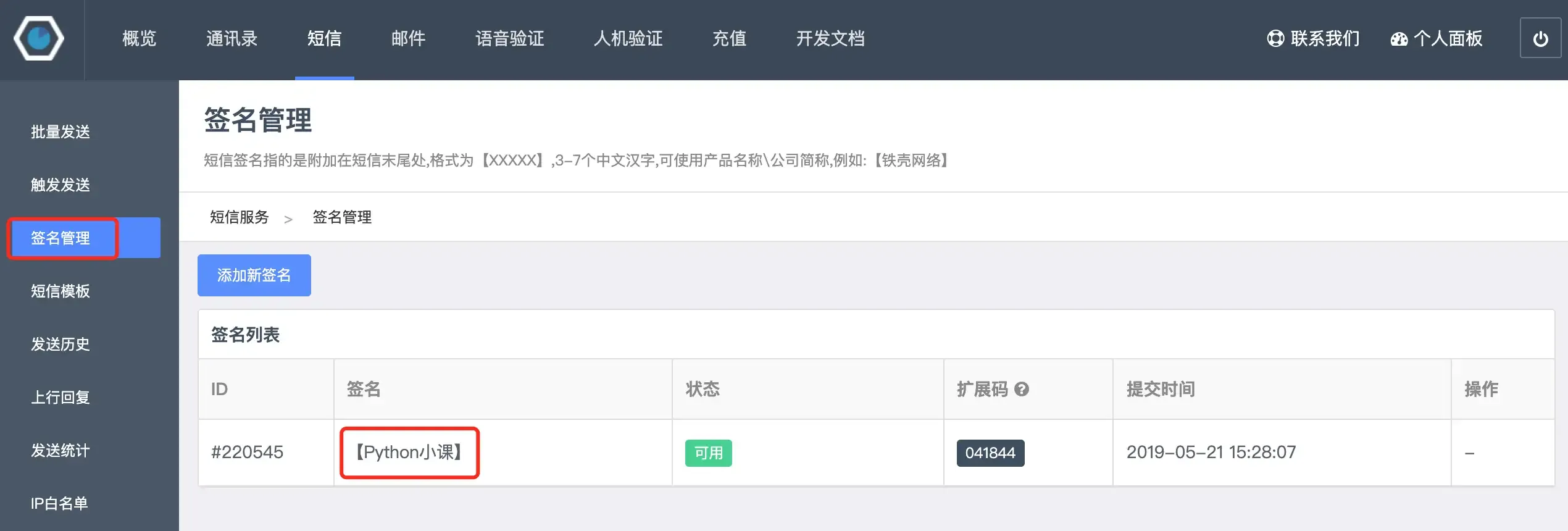
Of course, there are many domestic SMS platforms. Readers can choose according to their own needs (usually considering cost budget, SMS delivery rate, ease of use, and other indicators). If you need to use SMS services in commercial projects, it is recommended to purchase package services provided by SMS platforms.
Summary
In fact, sending emails, like sending SMS, can also be completed by calling third-party services. In actual commercial projects, it is recommended to set up your own mail server or purchase third-party services to send emails. This is a more reliable choice.