Object Serialization and Deserialization in Python

JSON Overview
Through the previous explanations, we already know how to save text data and binary data to files. But here’s another question: what if we want to save data from a list or dictionary to a file? In Python, we can save program data in JSON format. JSON is the abbreviation for “JavaScript Object Notation”. It was originally a literal syntax for creating objects in JavaScript, but now it has been widely used for cross-language and cross-platform data exchange. The reason for using JSON is very simple: because it has a compact structure and is pure text, any operating system and programming language can handle pure text, which is the prerequisite for implementing cross-language and cross-platform data exchange. Currently, JSON has basically replaced XML (Extensible Markup Language) as the de facto standard for data exchange between heterogeneous systems. You can find more knowledge about JSON on JSON’s official website, which also provides tools or third-party libraries that can be used to process JSON data format in each language.
{
    name: "Luo Hao",
    age: 40,
    friends: ["Wang Dachui", "Bai Yuanfang"],
    cars: [
        {"brand": "BMW", "max_speed": 240},
        {"brand": "Benz", "max_speed": 280},
        {"brand": "Audi", "max_speed": 280}
    ]
}
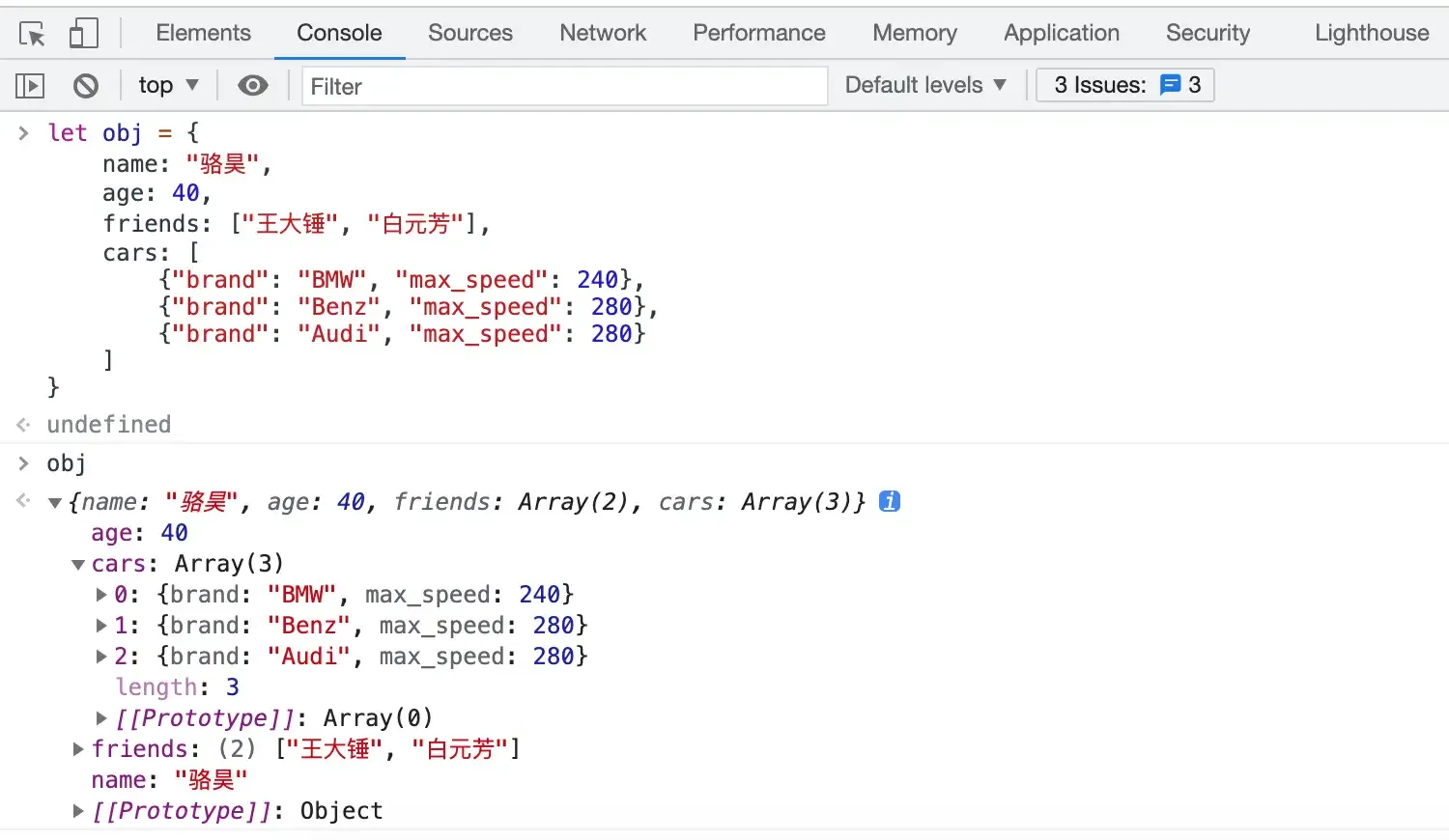
The above is a simple example of JSON. You may have already noticed that it’s very similar to Python dictionaries and supports nested structures, just like the value in a Python dictionary can be another dictionary. We can try entering the following code into the browser’s console (for Chrome browser, you can find the “Developer Tools” submenu through the “More Tools” menu to open the browser’s console). The browser’s console provides an interactive environment for running JavaScript code (similar to Python’s interactive environment). The following code will help us create a JavaScript object, which we assign to a variable named obj.
let obj = {
    name: "Luo Hao",
    age: 40,
    friends: ["Wang Dachui", "Bai Yuanfang"],
    cars: [
        {"brand": "BMW", "max_speed": 240},
        {"brand": "Benz", "max_speed": 280},
        {"brand": "Audi", "max_speed": 280}
    ]
}
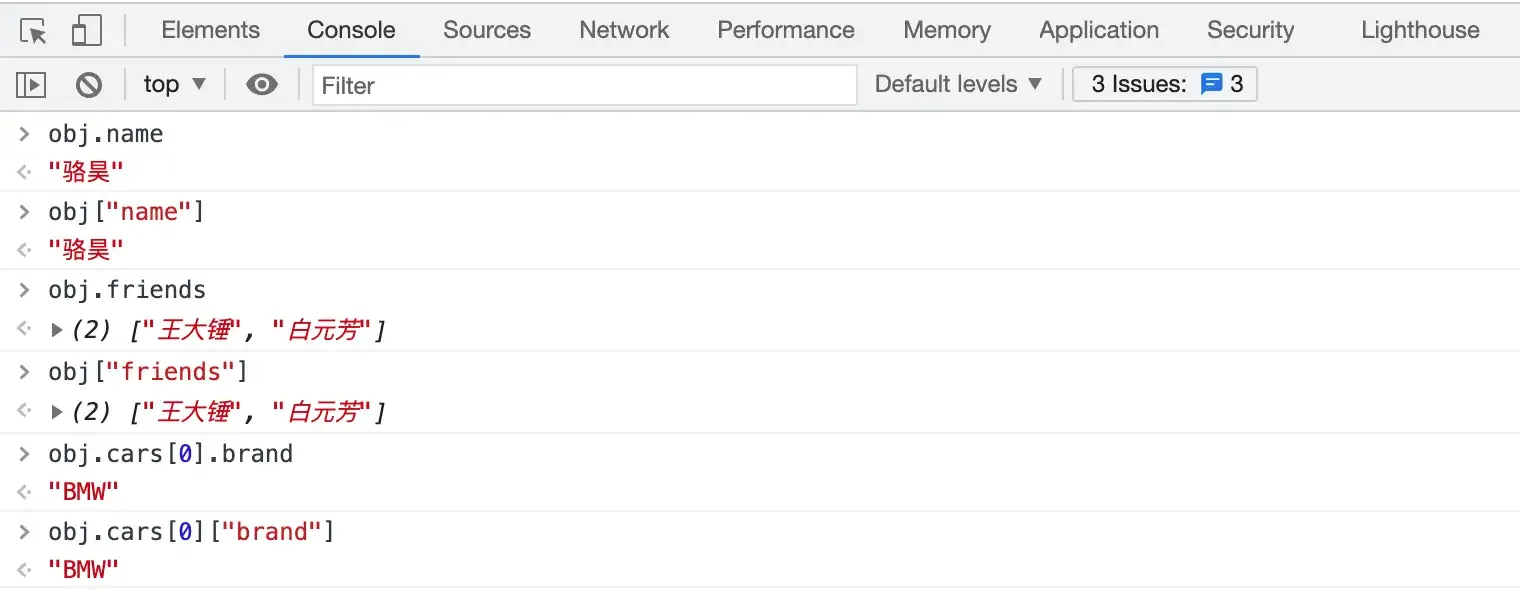
The obj above is an object in JavaScript. We can get the value corresponding to name through obj.name or obj["name"], as shown in the figure below. You can notice that the obj["name"] way of getting data is completely consistent with Python’s dictionary indexing operation to get values through keys, and Python also provides support for bidirectional conversion between dictionaries and JSON through a module named json.
The data types (values) we use in JSON (JavaScript data types) are also very easy to find corresponding relationships with Python data types. You can look at the following two tables.
Table 1: JavaScript data types (values) corresponding to Python data types (values)
| JSON | Python |
|---|---|
object | dict |
array | list |
string | str |
number | int / float |
number (real) | float |
boolean (true / false) | bool (True / False) |
null | None |
Table 2: Python data types (values) corresponding to JavaScript data types (values)
| Python | JSON |
|---|---|
dict | object |
list / tuple | array |
str | string |
int / float | number |
bool (True / False) | boolean (true / false) |
None | null |
Reading and Writing JSON Format Data
In Python, if you want to process a dictionary into JSON format (existing as a string), you can use the dumps function of the json module, as shown in the code below.
import json

my_dict = {
    'name': 'Luo Hao',
    'age': 40,
    'friends': ['Wang Dachui', 'Bai Yuanfang'],
    'cars': [
        {'brand': 'BMW', 'max_speed': 240},
        {'brand': 'Audi', 'max_speed': 280},
        {'brand': 'Benz', 'max_speed': 280}
    ]
}
print(json.dumps(my_dict))
Running the above code, the output is as follows. You can notice that Chinese characters are all displayed in Unicode encoding.
{"name": "\u9a86\u660a", "age": 40, "friends": ["\u738b\u5927\u9524", "\u767d\u5143\u82b3"], "cars": [{"brand": "BMW", "max_speed": 240}, {"brand": "Audi", "max_speed": 280}, {"brand": "Benz", "max_speed": 280}]}If you want to process a dictionary into JSON format and write it to a text file, you just need to replace the dumps function with the dump function and pass in the file object, as shown in the code below.
import json

my_dict = {
    'name': 'Luo Hao',
    'age': 40,
    'friends': ['Wang Dachui', 'Bai Yuanfang'],
    'cars': [
        {'brand': 'BMW', 'max_speed': 240},
        {'brand': 'Audi', 'max_speed': 280},
        {'brand': 'Benz', 'max_speed': 280}
    ]
}
with open('data.json', 'w') as file:
    json.dump(my_dict, file)
Executing the above code will create a data.json file, and the file’s content is the same as the output of the above code.
The json module has four relatively important functions:
dump- Serialize Python objects to a file in JSON formatdumps- Process Python objects into JSON format stringsload- Deserialize JSON data from a file into objectsloads- Deserialize string content into Python objects
Two concepts appear here: serialization and deserialization. Wikipedia explains: “Serialization in computer science data processing refers to converting the state of a data structure or object into a form that can be stored or transmitted, so that it can be restored to its original state when needed. Moreover, when bytes are retrieved from serialized data, these bytes can be used to produce a copy (replica) of the original object. The reverse action of this process, that is, the operation of extracting a data structure from a series of bytes, is deserialization.”
We can read the data.json file created above through the following code and restore the JSON format data to a Python dictionary.
import json

with open('data.json', 'r') as file:
    my_dict = json.load(file)
    print(type(my_dict))
    print(my_dict)
Package Management Tool pip
The json module in Python’s standard library doesn’t have ideal performance when serializing and deserializing data. To solve this problem, you can use the third-party library ujson to replace json. Third-party libraries refer to Python modules that are not developed and used internally by a company and do not come from the official standard library. These modules are usually developed by other companies, organizations, or individuals, so they are called third-party libraries. Although Python’s standard library already provides many modules to facilitate our development, for a powerful language, its ecosystem must also be very prosperous.
When installing the Python interpreter previously, pip was installed by default. You can confirm whether you have pip by using pip --version in the command prompt or terminal. pip is Python’s package management tool. Through pip, you can find, install, uninstall, and update Python’s third-party libraries or tools. macOS and Linux systems should use pip3. For example, to install ujson to replace the json module, you can use the following command.
pip install ujsonBy default, pip will access https://pypi.org/simple/ to obtain data related to third-party libraries, but the speed of accessing this website in China is not very ideal. Therefore, domestic users can use mirrors provided by Douban to replace this default download source, as shown below.
pip install ujsonYou can use the pip search command to find the third-party library you need by name, and you can use the pip list command to view installed third-party libraries. If you want to update a third-party library, you can use pip install -U or pip install --upgrade. If you want to delete a third-party library, you can use the pip uninstall command.
Search for the ujson third-party library.
pip search ujson

micropython-cpython-ujson (0.2)  - MicroPython module ujson ported to CPython
pycopy-cpython-ujson (0.2)       - Pycopy module ujson ported to CPython
ujson (3.0.0)                    - Ultra fast JSON encoder and decoder for Python
ujson-bedframe (1.33.0)          - Ultra fast JSON encoder and decoder for Python
ujson-segfault (2.1.57)          - Ultra fast JSON encoder and decoder for Python. Continuing
                                   development.
ujson-ia (2.1.1)                 - Ultra fast JSON encoder and decoder for Python (Internet
                                   Archive fork)
ujson-x (1.37)                   - Ultra fast JSON encoder and decoder for Python
ujson-x-legacy (1.35.1)          - Ultra fast JSON encoder and decoder for Python
drf_ujson (1.2)                  - Django Rest Framework UJSON Renderer
drf-ujson2 (1.6.1)               - Django Rest Framework UJSON Renderer
ujsonDB (0.1.0)                  - A lightweight and simple database using ujson.
fast-json (0.3.2)                - Combines best parts of json and ujson for fast serialization
decimal-monkeypatch (0.4.3)      - Python 2 performance patches: decimal to cdecimal, json to
                                   ujson for psycopg2
View installed third-party libraries.
pip list

Package                       Version
----------------------------- ----------
aiohttp                       3.5.4
alipay                        0.7.4
altgraph                      0.16.1
amqp                          2.4.2
...							  ...
Update the ujson third-party library.
pip install -U ujsonDelete the ujson third-party library.
pip uninstall -y ujsonTip: If you want to update
pipitself, for macOS systems, you can use the commandpip install -U pip. On Windows systems, you can replace the command withpython -m pip install -U --user pip.
Using Network APIs to Get Data
If we want to display weather, traffic, flight, and other information in our own programs, we don’t have the ability to provide this information ourselves, so we must use network data services. Currently, the vast majority of network data services (or network APIs) provide JSON format data based on HTTP or HTTPS. We can send HTTP requests to a specified URL (Uniform Resource Locator) through Python programs. This URL is the so-called network API. If the request is successful, it will return an HTTP response, and the message body of the HTTP response contains the JSON format data we need. For knowledge about HTTP, you can read Ruan Yifeng’s article “Introduction to HTTP Protocol”.
There are many websites in China that provide network API interfaces, such as Juhe Data, Avatar Data, etc. These websites have free and paid data interfaces. The foreign website {API}Search also provides similar functions, and those interested can research on their own. The following example demonstrates how to use the requests library (a third-party library for accessing network resources based on HTTP) to access network APIs to get domestic news and display news titles and links. In this example, we use the domestic news data interface provided by a website called Tianapi. The APIKey needs to be registered and applied for on the website yourself. After registering an account on the Tianapi website, an APIKey will be automatically assigned, but to access the interface to get data, you need to bind and verify your email or phone, and then apply for the interface you need to use, as shown in the figure below.

To access the network through URLs in Python, we recommend using the requests third-party library, which is simple and powerful but needs to be installed separately.
pip install requestsGet domestic news and display news titles and links.
import requests

resp = requests.get('http://api.tianapi.com/guonei/?key=APIKey&num=10')
if resp.status_code == 200:
    data_model = resp.json()
    for news in data_model['newslist']:
        print(news['title'])
        print(news['url'])
        print('-' * 60)
The above code uses the get function of the requests module to initiate a request to Tianapi’s domestic news interface. If there are no problems during the request process, the get function will return a Response object. The status_code attribute of this object represents the HTTP response status code. If you don’t understand, it doesn’t matter. You just need to pay attention to its value. If the value equals 200 or other values starting with 2, then our request was successful. The json() method of the Response object can directly process the returned JSON format data into a Python dictionary, which is very convenient. The JSON format data (partial) returned by Tianapi’s domestic news interface is shown in the figure below.
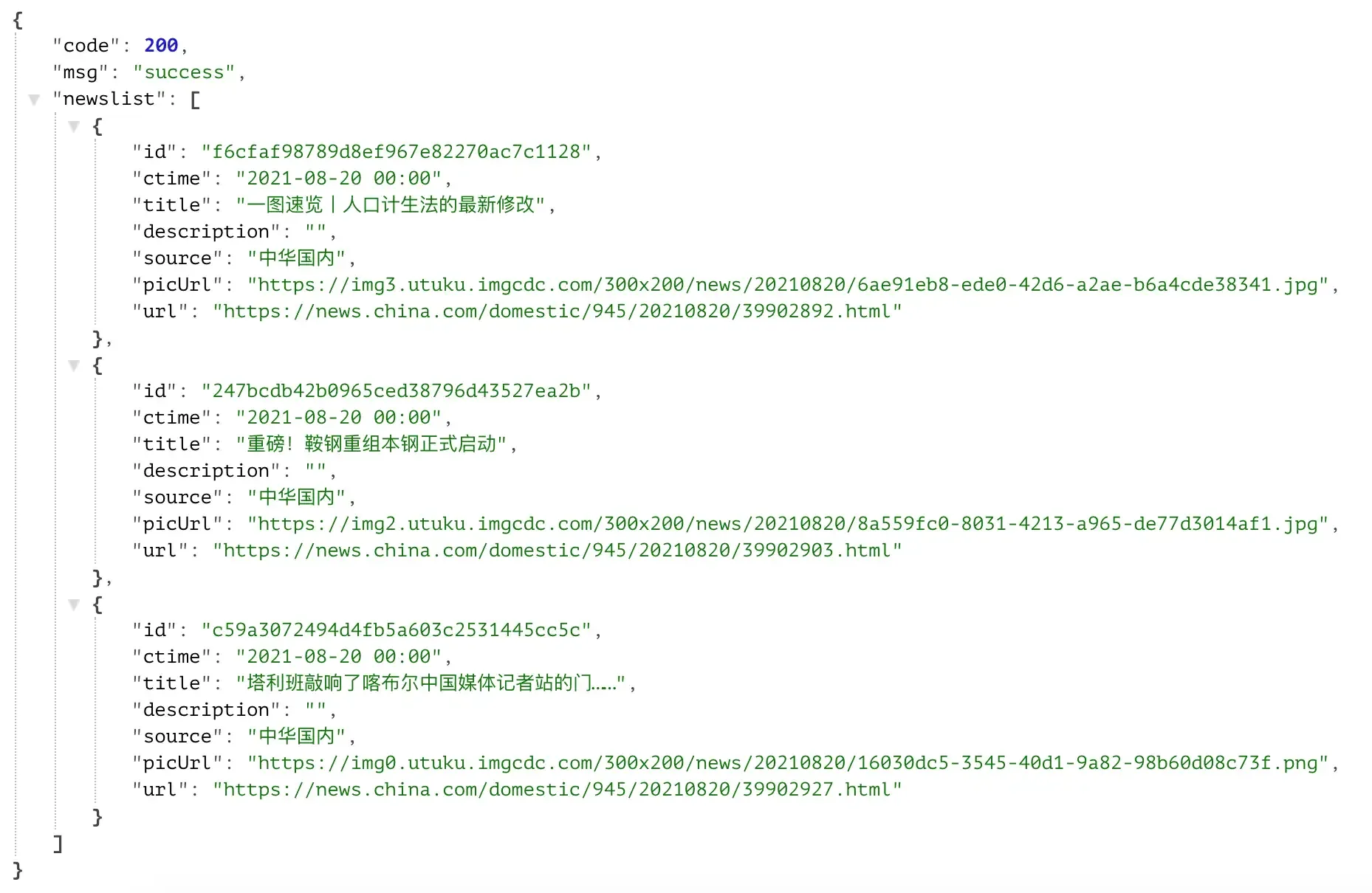
Tip: The APIKey in the above code needs to be replaced with your own APIKey applied for on the Tianapi website. The Tianapi website also provides many very interesting API interfaces, such as garbage classification, Zhou Gong’s Dream Interpretation, etc. You can call these interfaces following the above code. Each interface has corresponding interface documentation, which contains detailed instructions on how to use the interface.
Summary
In addition to using the json module, Python can also use the pickle and shelve modules to implement serialization and deserialization. However, these two modules use proprietary serialization protocols to serialize data, so the serialized data can only be recognized by Python. Readers interested in these two modules can search for information on the Internet themselves. Processing JSON format data is obviously a skill that programmers must master, because whether accessing network API interfaces or providing network API interfaces for others to use, you need to have knowledge related to processing JSON format data.